By clicking “Accept All Cookies”, you agree to the storing of cookies on your device to enhance site navigation, analyze site usage, and assist in our marketing efforts. View our Privacy Policy for more information.
The problem with sending confidential documents by email is that once the file is attached and sent, you have no control over it. A better approach is to share a tracked secure link instead of an attachment; the recipient gets the same experience, but you can see when they opened it, revoke access at any time, update the document without resending, and prevent downloads. For anything that needs to stay confidential, a controlled link is the right tool.
Email is the default because it is easy. You attach the file, you press send, and it is done. The problem is that "done" is exactly what it is; once that attachment leaves your outbox, you have no visibility into what happens to it and no ability to change anything about it.
For most documents, that is fine. For confidential documents, financial models, client proposals, pitch decks, contracts, and legal agreements, the lack of control is a real liability. And in situations where knowing whether someone actually read something matters, sending a static attachment is working blind.
Why email is not secure enough for confidential documents
Email attachments have four fundamental weaknesses when confidentiality matters. First, there is no expiry; the file lives in the recipient's inbox and attachment storage permanently, or until they delete it manually. Second, there is no tracking; you have no idea whether they opened it, when, or how long they spent on it. Third, there is no revocation; once sent, you cannot unsend or restrict access. Fourth, there is no audit trail; in any situation where you need to know who saw what and when, email gives you nothing.
There is also the forwarding problem. An email attachment can be forwarded to any number of people without your knowledge. One recipient becomes ten, which becomes unknown. The problem with sending docs over WhatsApp covers the same issue in the context of messaging platforms; the core vulnerability is identical.
Lorem ipsum dolor sit amet, consectetur adipiscing elit. Suspendisse varius enim in eros elementum tristique. Duis cursus, mi quis viverra ornare, eros dolor interdum nulla, ut commodo diam libero vitae erat. Aenean faucibus nibh et justo cursus id rutrum lorem imperdiet. Nunc ut sem vitae risus tristique posuere.
What is the safest way to send a confidential document?
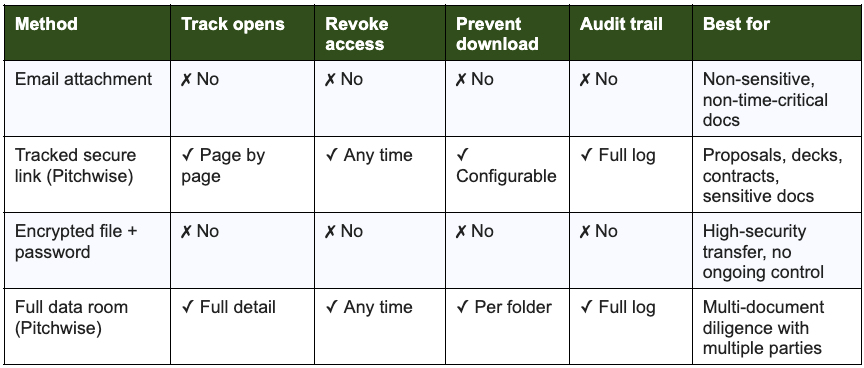
The safest approach for most business contexts is a tracked, permissioned link to a controlled viewing environment. Upload the document to a secure platform, generate a link with the access settings you need, and share that link, not the file itself. The recipient clicks the link and views the document just as they would an attachment, but you stay connected to it on your end.
The difference between the main approaches looks like this:
The safest way to send a confidential document
For single documents, a proposal, a deck, or a contract, a tracked link is usually the right tool. A data room makes sense when you are sharing multiple documents with multiple parties simultaneously, such as in a fundraising or M&A process. How to track a document sent by email covers how tracked links integrate with email specifically.
How do tracked links work for document sharing?
A tracked link works by hosting the document on a secure server and giving you a URL that acts as a controlled gateway to it. The recipient clicks the link on their phone, in a browser, in any environment, and views the document there rather than downloading a local copy.
Because the document stays on the server rather than on the recipient's device, you retain control over it. With Pitchwise, you can see exactly when the recipient opened it, how long they spent on each page, whether they came back for a second look, and whether they forwarded the link to someone else. You can revoke the link at any time, making the document inaccessible even to someone who saved the URL.
✓ TipIf you send an updated version of a document after sharing the link, you can replace the file behind the same URL. The recipient does not need a new link; they automatically see the current version. This is particularly useful for proposals or decks that get revised during a negotiation.
What about encrypted email, is that enough?
Encrypted email (tools like S/MIME, PGP, or services like ProtonMail) addresses the transmission risk; it ensures the email cannot be intercepted in transit. It does not address the destination risk. Once the encrypted email is delivered and decrypted by the recipient, the attachment is a regular file on their device, with all the same limitations as any email attachment.
Encrypted email is appropriate for situations where interception during transit is the primary concern, legal communications, regulatory filings, and situations with a known adversarial interception risk. For most business document sharing where the concern is control, tracking, and revocability, encrypted email solves the wrong problem.
When to use a full data room versus a tracked link
A tracked link is the right tool for a single document or a small set of documents shared with one party. A data room is the right tool when you are sharing many documents with many parties simultaneously and need to manage different access levels for different recipients.
In a fundraising context: use tracked links for your pitch deck in early-stage conversations, and graduate to a full data room when active diligence starts and investors are asking for the full set of materials. Both provide tracking and control; the difference is scale and organisational structure.
For sales contexts, sharing proposals, pricing documents, or contracts, a tracked link is almost always the right choice. It gives you the visibility to know whether your prospect has actually read the proposal, which pages they spent the most time on, and when they came back to re-read it before making a decision. Stop sending pitch decks as attachmentss the engagement data this visibility produces and how to act on it.
Frequently Asked Questions
What is the safest way to send a confidential document?
A tracked, permissioned link to a controlled viewing environment, not an email attachment. Upload the document to a secure platform, set the access controls (view-only, no download, expiry if needed), and share the link. The recipient views the document in the browser; you retain visibility and control throughout.
Is email safe for sending sensitive documents?
Email is adequate for non-sensitive documents. For anything confidential, it falls short: no tracking, no expiry, no revocation, no audit trail, and attachments can be forwarded to anyone without your knowledge. Encrypted email helps with interception in transit but does not solve the destination control problem.
What can a tracked link do that email cannot?
A tracked link shows you when the document was opened, how long the recipient spent on each page, whether they came back, and whether the link was forwarded. You can revoke access at any time, update the document without resending, and prevent downloads. Email gives you none of this after the attachment lands in the inbox.
When should you use a data room instead of a tracked link?
When you are sharing many documents with many parties simultaneously and need to manage different access levels for different recipients, typically in investor due diligence or M&A processes. For single documents shared with one party, a tracked link is faster and equally controlled.
Lorem ipsum dolor sit amet, consectetur adipiscing elit. Suspendisse varius enim in eros elementum tristique. Duis cursus, mi quis viverra ornare, eros dolor interdum nulla, ut commodo diam libero vitae erat. Aenean faucibus nibh et justo cursus id rutrum lorem imperdiet. Nunc ut sem vitae risus tristique posuere.
Lorem ipsum dolor sit amet, consectetur adipiscing elit. Suspendisse varius enim in eros elementum tristique. Duis cursus, mi quis viverra ornare, eros dolor interdum nulla, ut commodo diam libero vitae erat. Aenean faucibus nibh et justo cursus id rutrum lorem imperdiet. Nunc ut sem vitae risus tristique posuere.