
Slide-level analytics for every document you send
Pitchwise tracks time on every slide, for every viewer, on every visit, in real time. Know which slide held your investor for 4 minutes, where your prospect dropped off, and the moment a cold lead comes back for a third look.
No credit card required
"I can see who opened my deck, how many times, and which slides got attention. It has given me way more confidence following up with investors."

Aman Sandhu
Founder & CEO · Sareti AI
See what happens after you hit send
Send a PDF over email and you're working blind. You don't know if it was opened, which sections held attention, where the reader dropped off, or whether they ever came back for a second look. You just wait, then send a "just checking in" message, then wait some more.
Pitchwise turns every document you share into a live signal. The recipient gets a clean viewing experience. You get slide-by-slide engagement for every viewer, every visit, in real time.
Start for FreePitchwise turns every document you share into a live signal. The recipient gets a clean viewing experience. You get slide-by-slide engagement for every viewer, every visit, in real time.
No more guessing, no more just checking in
Six signals every Pitchwise document captures the moment it's opened.

Which slides stopped them
Not just "they opened it". See the slides that held attention and the ones they skipped past.

How long did they actually stay?
Time per slide, per visit. The difference between a skim and a serious read.
.png)
Exactly who it was
When viewers verify their email, engagement ties to a name, not an anonymous visitor count.

The moment they open it
A real-time alert, not a daily digest. Call them while your deck is literally on their screen.

When they come back
A return visit is a buying signal. A third visit is a green light. You'll know about both.
.png)
Where and how
Location, device, and OS are useful when a link reaches further than you sent it.
The full picture of how your document performed
Pitchwise turns every shared document into a live intelligence feed. See who opened it, what they read, and when they came back.
%20(1).png)
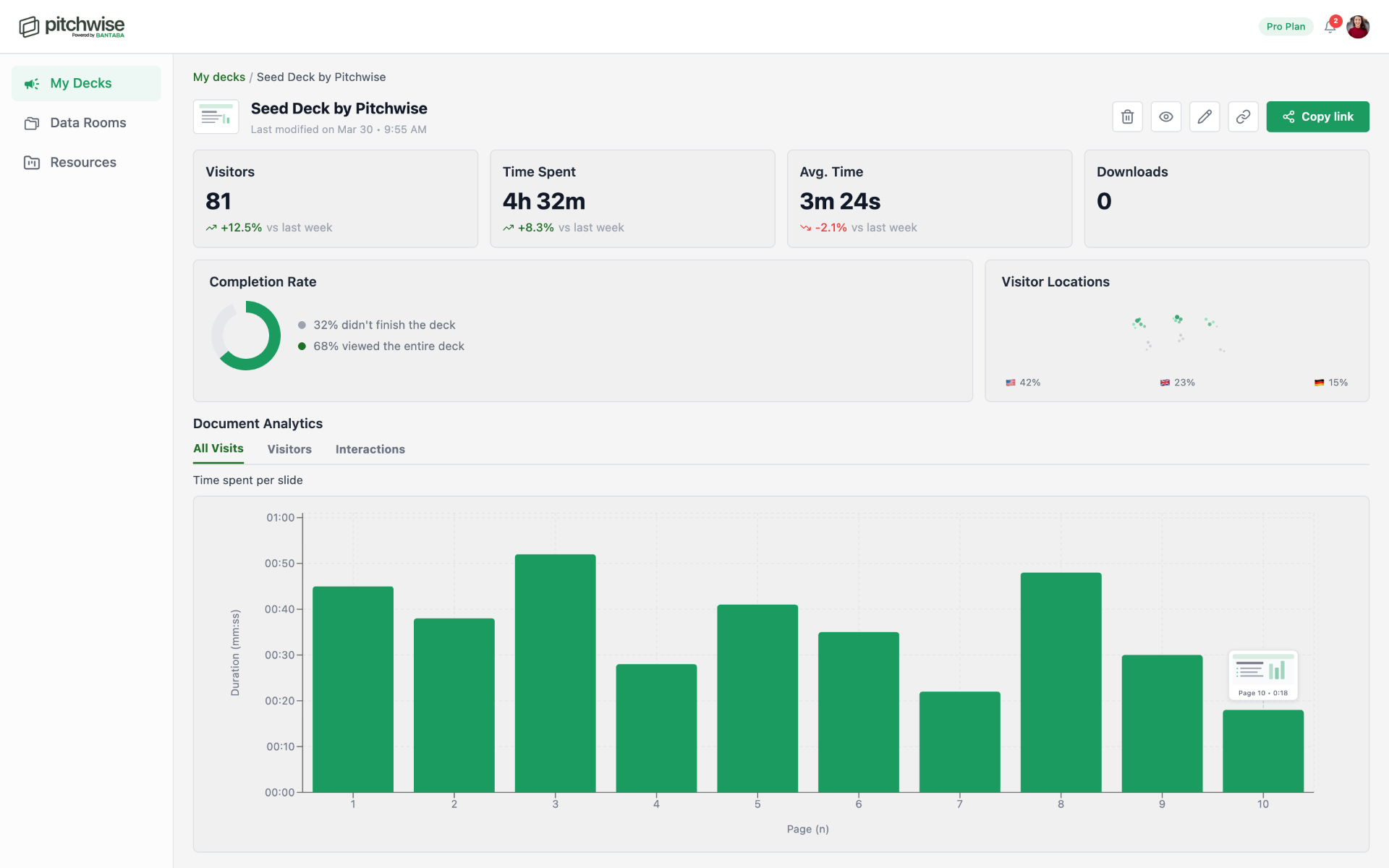
See where attention goes
Know exactly which slides hold your reader's attention and which ones lose it. Track time spent per page, completion rate, and the precise slide where engagement falls away.
✓
Time spent per slide
✓
Completion rate and drop-off point
✓
Slide-by-slide engagement breakdown
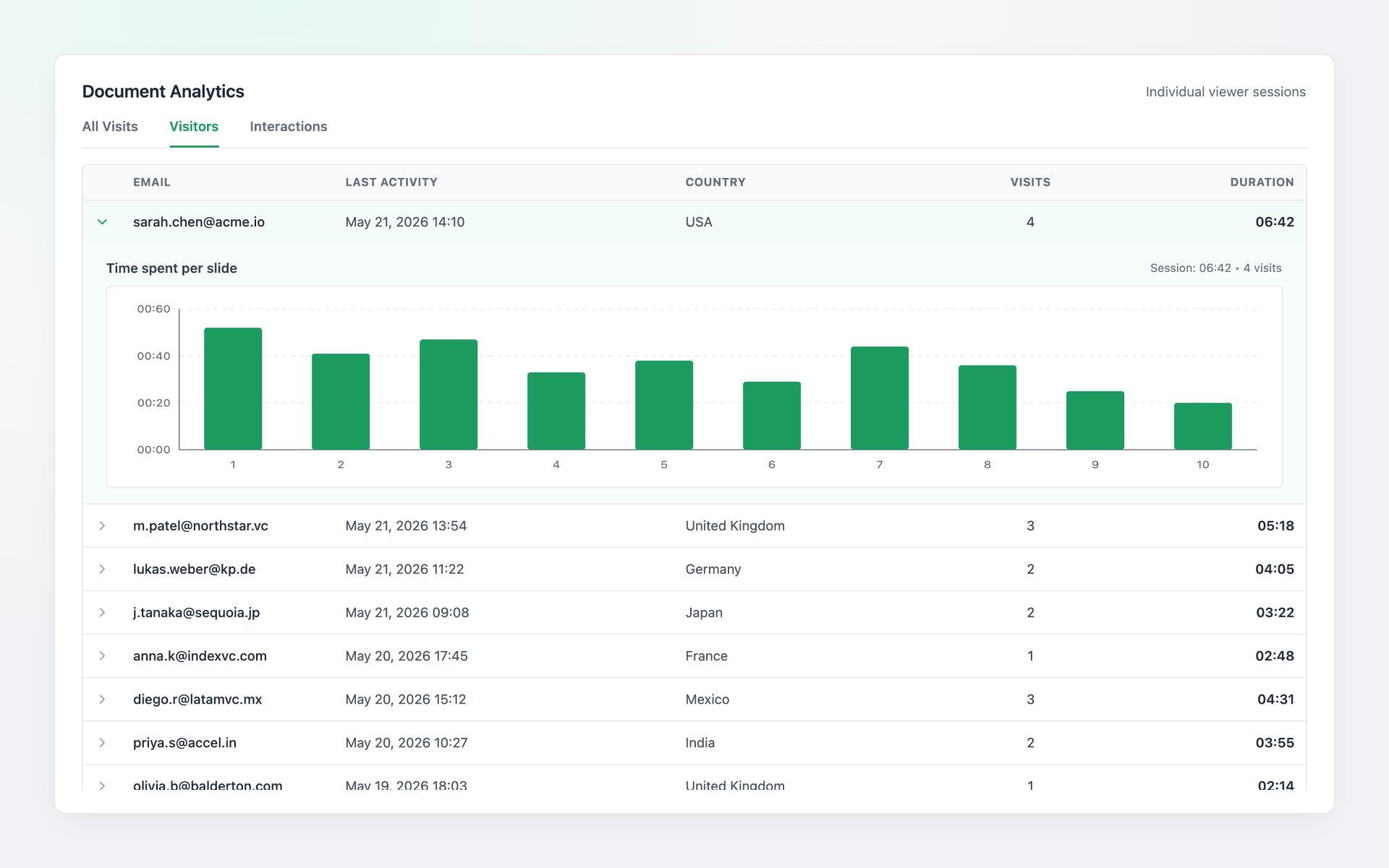
Know who's reading
When viewers verify their email, their engagement is attributed to their identity. See exactly how a specific investor or buyer engaged across every visit, slide by slide, visit by visit.
✓
Email-verified identity tracking
✓
Per-visitor engagement breakdown
✓
Return visit tracking
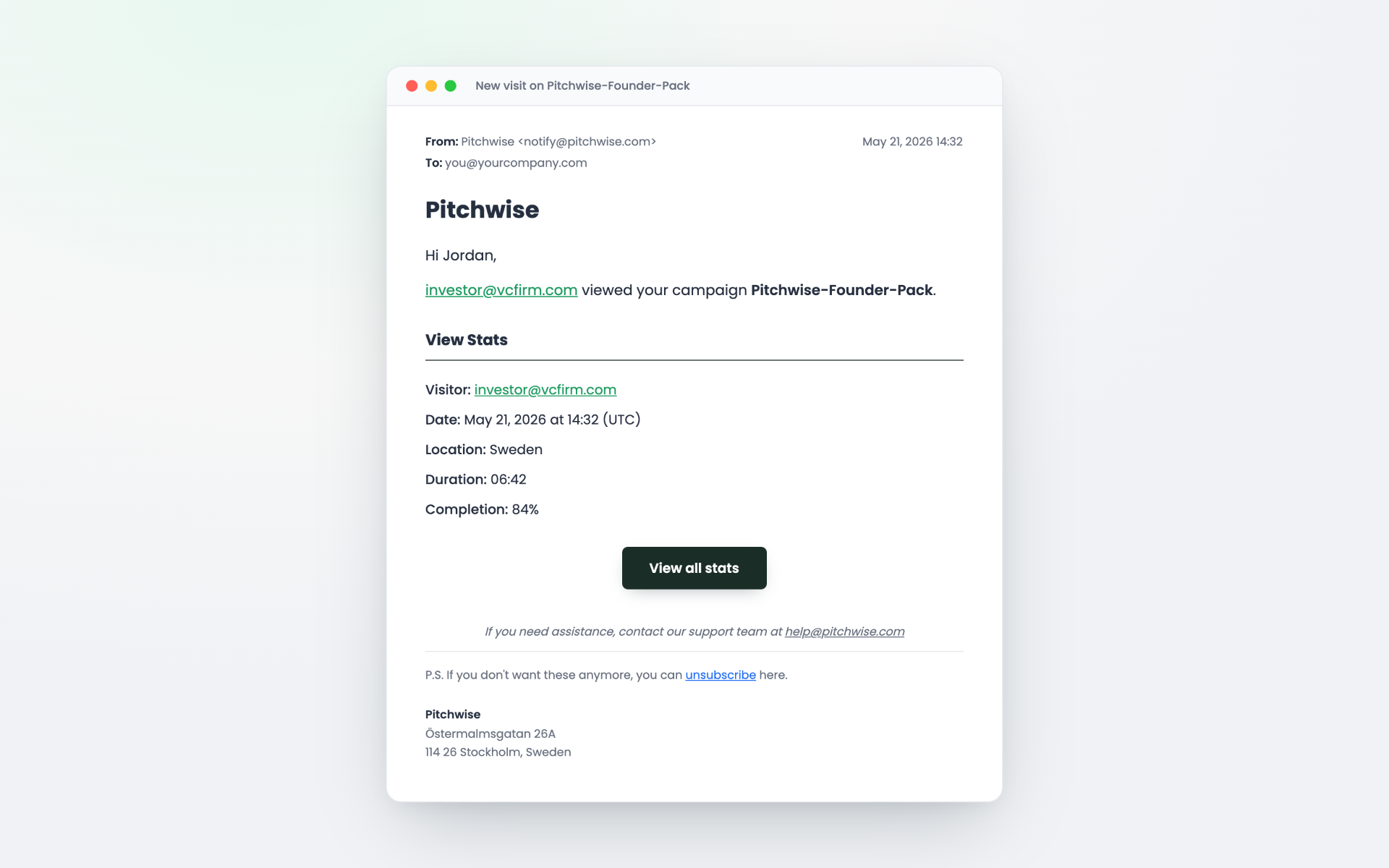
Follow up at the right moment
Get notified the moment your document is opened, not a daily digest. When they come back for a second or third look, you'll know that too.
✓
Real-time open alerts
✓
Return visit detection
✓
Smart follow-up timing
Understand the full picture
The All Visits view shows aggregate patterns across everyone who opened your document. The Visitors tab lets you drill into individuals. Everything in one dashboard, no exports, no manual aggregation.
✓
All Visits vs Visitors view
✓
Geographic and device insights
✓
In-document CTA and interaction tracking
Who uses Pitchwise slide-level analytics

Founders
Know which slides investors lingered on and which they skipped, then walk into your next meeting prepared for the exact questions their reading pattern suggests.

Sales teams
See the moment a prospect opens your proposal, where they paused, and when they came back for a second look.

Finance and ops
Track who actually read the board pack and which sections held their attention before the meeting starts.

Agencies and consultants
Watch how clients engage with proposals and reports so you can follow up on the parts that mattered to them.

BD and partnerships
Spot the partner who opened your brief three times and the one who never made it past the cover.
Frequently Asked Questions
Does analytics work for all document types?


Yes. Pitchwise tracks time per page for any PDF or presentation you share, regardless of length or format. Every slide in your document is individually tracked.
Can I see analytics for specific recipients?
Yes. When viewers input their email before viewing, analytics are tied to their identity. You see exactly how an individual engaged across all of their visits to your document.
Are analytics available in real time?
Yes. Engagement data appears in your dashboard the moment a viewer opens your document. Open alerts are sent immediately, not in batches.
Do recipients know they are being tracked?
Pitchwise documents are delivered through a standard document viewer. Engagement tracking is standard practice on professional document-sharing platforms. You can choose to note this in your communications.
How long is analytics data kept?
Analytics data is retained for the lifetime of your Pitchwise account. You can review historical engagement on any document you've ever shared.
What's the difference between 'All Visits' and 'Visitors'?
All Visits aggregates the time spent per page across all document views by all visitors, useful for spotting overall patterns. Visitors breaks it down by individual email address, which is useful for understanding how a specific person engaged across multiple sessions.
Can I export analytics data?
Yes. Analytics export is available on Pro and Teams plans. Export visitor engagement summaries into your CRM, investor tracking tools, or reporting workflows.
See every slide. Follow up at the right moment.
Start tracking your documents with slide-by-slide analytics and real-time
alerts. Free to get started.
Start Securely Sharingalerts. Free to get started.