By clicking “Accept All Cookies”, you agree to the storing of cookies on your device to enhance site navigation, analyze site usage, and assist in our marketing efforts. View our Privacy Policy for more information.
How to Know If a Client Has Actually Read Your Proposal
by
Oluwadamilare Akinpelu
You send the proposal. The client says they will take a look. Then nothing. You do not know whether they opened it, skimmed the pricing page and closed it, or read it carefully and are now comparing you to someone else. That uncertainty shapes every follow-up decision you make, and it usually pushes you in the wrong direction.
Document tracking tools solve this. They tell you whether the proposal was opened, which pages the client spent time on, and whether they came back for a second read. Here is how they work and how to use the data.
Why following up blind usually goes wrong
Without tracking data, most people follow up on proposals by guessing. They wait a set number of days, send a check-in message, and interpret silence as disinterest. That reading is often wrong.
A client who opened your proposal four times in two days and spent ten minutes on your approach section is working through a decision. A client who has not opened the document may simply not have seen the email. Both situations look identical from the outside. Treating them the same means you either follow up too early on a deal that is moving or you wait too long on one that has gone cold because the email never landed.
Lorem ipsum dolor sit amet, consectetur adipiscing elit. Suspendisse varius enim in eros elementum tristique. Duis cursus, mi quis viverra ornare, eros dolor interdum nulla, ut commodo diam libero vitae erat. Aenean faucibus nibh et justo cursus id rutrum lorem imperdiet. Nunc ut sem vitae risus tristique posuere.
Whether the document was opened and the exact time it happened
How long the recipient spent on each page or slide
Whether they returned to the document after the first view
Whether the link was opened from a different device or location, which can indicate the proposal was forwarded internally
The page-level data is where the real signal is. A client who spent six minutes on your methodology section and thirty seconds on pricing is engaged with the substance of the work. A client who went straight to the pricing page and closed the document is focused primarily on cost. Both tell you something specific about where the conversation needs to go next.
How to read the data without drawing the wrong conclusions
An open is not a buying signal on its own
People open documents for many reasons. What tracking data tells you is attention, not intent. Use it to understand where questions are forming, not to conclude that a deal is won or lost.
High time on a section means questions exist there
If a client spent four minutes on your timeline page, your next message should address the timeline directly. Do not wait for them to raise it. Referencing it in your follow-up shows you are thinking about their specific situation, and it gives them an easy entry point into the conversation.
A second or third open usually means internal review
When a proposal is opened a few days after the first view, particularly from a different device or at a different time of day, someone else is looking at it. The person you sent it to thought it was worth sharing with a colleague or a decision-maker. That is a positive sign. It means the process has moved forward, even if you have not heard anything.
No open after two business days is a prompt to resend
If the document has not been opened after two days, it may have landed in spam, been missed in a busy inbox, or the timing was off. Resend the link with a short message. Something that acknowledges the proposal exists without assuming they read it. That resend generates the open you are looking for more often than it is ignored.
How to follow up based on what you know
They opened it and spent meaningful time on it
Wait 24 to 48 hours, then follow up referencing a point from the proposal. You do not need to mention that you tracked the open. A message that says "I wanted to check if you had any questions about the approach we outlined" is enough. It signals that you are attentive and that you are thinking about their specific situation rather than sending a generic chase.
They have not opened it after two business days
Send a short follow-up that includes the link again. Keep it brief. Acknowledge that they may not have had a chance to look at it yet. Resending in this context generates opens far more often than it creates friction.
They have opened it multiple times without reaching out
They are still working through a decision. A check-in message asking whether they have questions is the right move. Keep it to two sentences. They already have all the information. What they need is an easy way to ask the questions they are sitting on.
How to set this up
Most document tracking tools work the same way. You upload the proposal, generate a tracked link, and share that link in your email instead of attaching the file. The recipient clicks the link and views the document in their browser. The tracking happens in the background.
The steps:
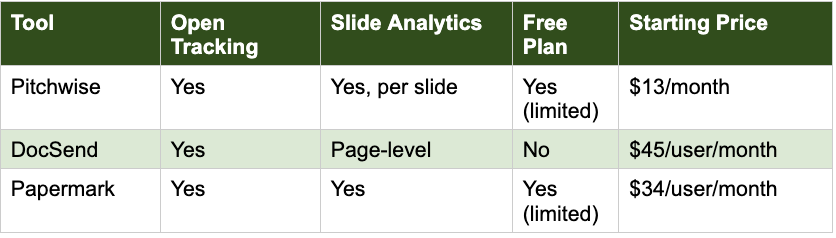
Upload your proposal to a tracking tool such as Pitchwise or DocSend
Generate a tracked link from the tool rather than downloading and attaching the file
Paste that link into your email where you would normally attach the document
Check the analytics dashboard after 24 to 48 hours
Is it ethical to track whether a client opened a document?
Yes. Document tracking is standard practice across sales and business development. You are tracking engagement with a document you sent, not accessing any information on the client's side. Most professionals who use tracked links do not disclose it, in the same way that email open tracking in marketing tools is not typically disclosed to recipients.
What if the client forwards the link to someone else in their company?
If the tool tracks unique sessions, you will see multiple opens from different sessions. That usually means the proposal is being reviewed by a second decision-maker. Some tools show you the location or device type of each opener, which can tell you whether the proposal has reached someone in a different department or office. Treat it as a positive signal and give the process a little more time before following up.
Does document tracking work if I attach a PDF to an email?
No. Document tracking requires a link rather than an attachment. Instead of attaching the file, you upload it to the tracking tool, generate a tracked link, and include that link in your email. The recipient clicks the link and views the document in their browser. The experience for them is similar to opening an attachment, but you get the engagement data on your side.
Can the client tell the document is being tracked?
In most cases, no. The link looks like a standard web link. Some tools display a small notice that the document is protected or access-controlled, but engagement tracking in the background is not visible to the recipient.
What is the difference between page-level and slide-level analytics?
Page-level analytics tell you how long a recipient spent on each page of the document overall. Slide-level analytics break that down further, showing you the time spent on each individual slide or section. Slide-level data is more useful when your proposal has distinct sections that each carry different weight in the client's decision, such as pricing, timeline, and methodology. Pitchwise provides slide-level analytics. DocSend and PandaDoc provide page-level.
Send your next proposal knowing exactly how it was read
Pitchwise gives you slide-level analytics on every document you share. You see who opened it, which sections they spent time on, and whether they came back. The next follow-up call you make, you will already know which part of your proposal is driving the conversation. Get started: app.pitchwise.se
Lorem ipsum dolor sit amet, consectetur adipiscing elit. Suspendisse varius enim in eros elementum tristique. Duis cursus, mi quis viverra ornare, eros dolor interdum nulla, ut commodo diam libero vitae erat. Aenean faucibus nibh et justo cursus id rutrum lorem imperdiet. Nunc ut sem vitae risus tristique posuere.
Lorem ipsum dolor sit amet, consectetur adipiscing elit. Suspendisse varius enim in eros elementum tristique. Duis cursus, mi quis viverra ornare, eros dolor interdum nulla, ut commodo diam libero vitae erat. Aenean faucibus nibh et justo cursus id rutrum lorem imperdiet. Nunc ut sem vitae risus tristique posuere.





.png)
.png)